> ## Documentation Index
> Fetch the complete documentation index at: https://docs.videngineer.com/llms.txt
> Use this file to discover all available pages before exploring further.
# Account & billing
> Manage profile, usage, balance, API key, invoices, plan changes, and cancellation.
Account & billing answers: **where do I manage my videngineer account and subscription?**
Use Account for profile details, usage, credit balance, API key, invoices, plan changes, and cancellation.
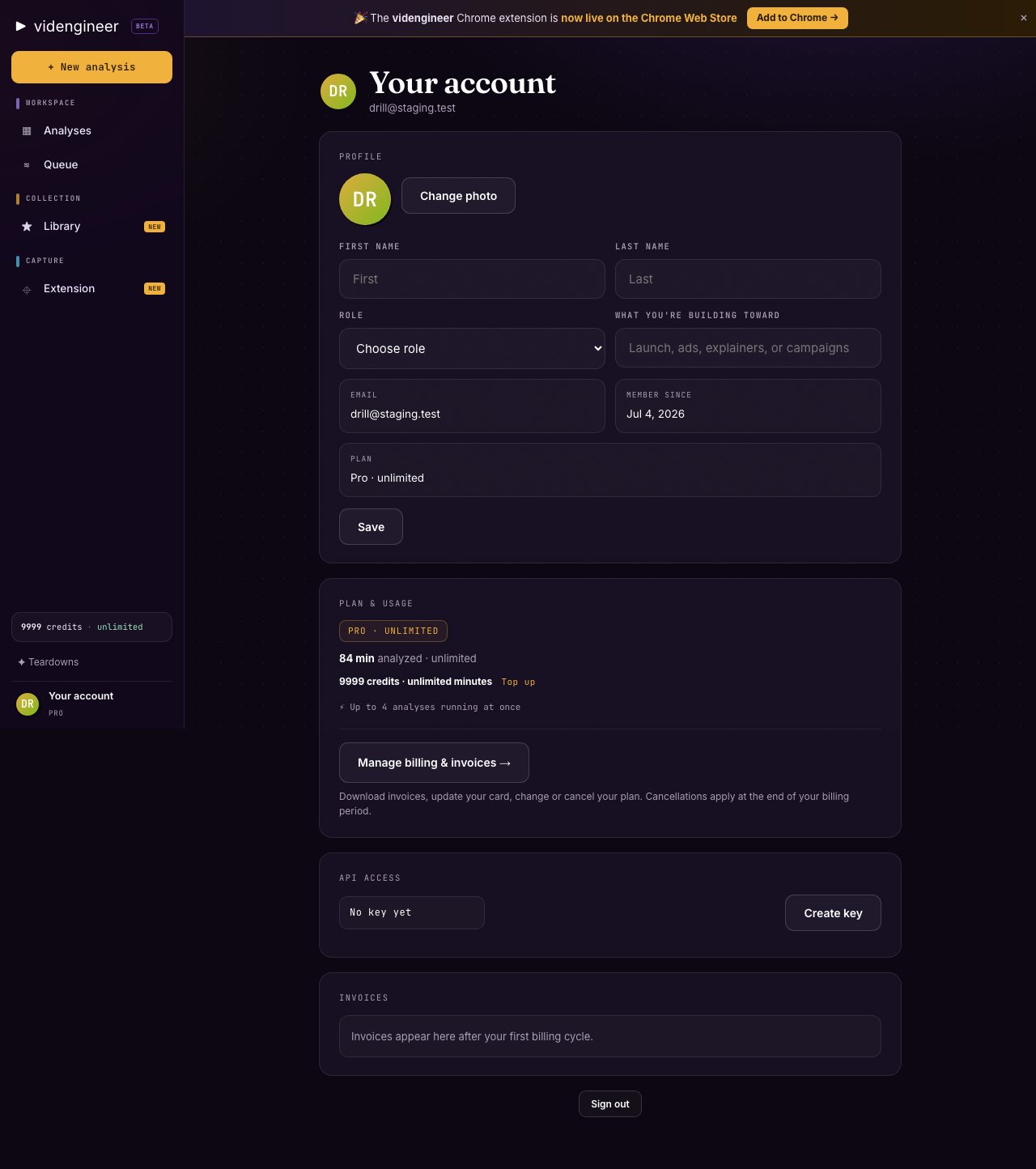 ## What you can manage
| Area | What it is for |
| ------- | ------------------------------------------------ |
| Profile | Your account identity and basic settings |
| Usage | Current usage and plan activity |
| Balance | Monthly credits and top-up credits |
| API key | Programmatic access for approved workflows |
| Billing | Plan, invoices, payment method, and cancellation |
## Invoices and cancellation
Billing is self-serve from the account area. Use it to review invoices, update billing details, change plan when available, or cancel.
Canceling stops future billing according to the active billing terms. It does not turn public teardowns into private assets or grant rights to source materials.
## Credit balance
The balance area shows available credits. Monthly plan credits and top-up credits can both be used for paid actions. Top-ups are valid for 12 months.
## API key
The API key is for approved workflows that need programmatic access, such as triggering supported project actions. Keep it private and rotate it if it is exposed.
## Related pages
Plan levels, monthly credits, and top-up behavior.
Seat pricing, pooled credits, and shared Library.
## What you can manage
| Area | What it is for |
| ------- | ------------------------------------------------ |
| Profile | Your account identity and basic settings |
| Usage | Current usage and plan activity |
| Balance | Monthly credits and top-up credits |
| API key | Programmatic access for approved workflows |
| Billing | Plan, invoices, payment method, and cancellation |
## Invoices and cancellation
Billing is self-serve from the account area. Use it to review invoices, update billing details, change plan when available, or cancel.
Canceling stops future billing according to the active billing terms. It does not turn public teardowns into private assets or grant rights to source materials.
## Credit balance
The balance area shows available credits. Monthly plan credits and top-up credits can both be used for paid actions. Top-ups are valid for 12 months.
## API key
The API key is for approved workflows that need programmatic access, such as triggering supported project actions. Keep it private and rotate it if it is exposed.
## Related pages
Plan levels, monthly credits, and top-up behavior.
Seat pricing, pooled credits, and shared Library.