> ## Documentation Index
> Fetch the complete documentation index at: https://docs.videngineer.com/llms.txt
> Use this file to discover all available pages before exploring further.
# The Blueprint
> The frame-by-frame visual structure: shot mix, camera language, pacing, palette, and what it would take to rebuild.
The Blueprint answers one question: **how is this video built, visually?** videngineer samples frames across the whole runtime, reads each one with a vision model, and aggregates the result into a production-style breakdown — shot types, camera angles, animation intensity, text overlays, color, and pacing. It's the layer you open when you want to know *what the edit is doing*, not what the script is saying.
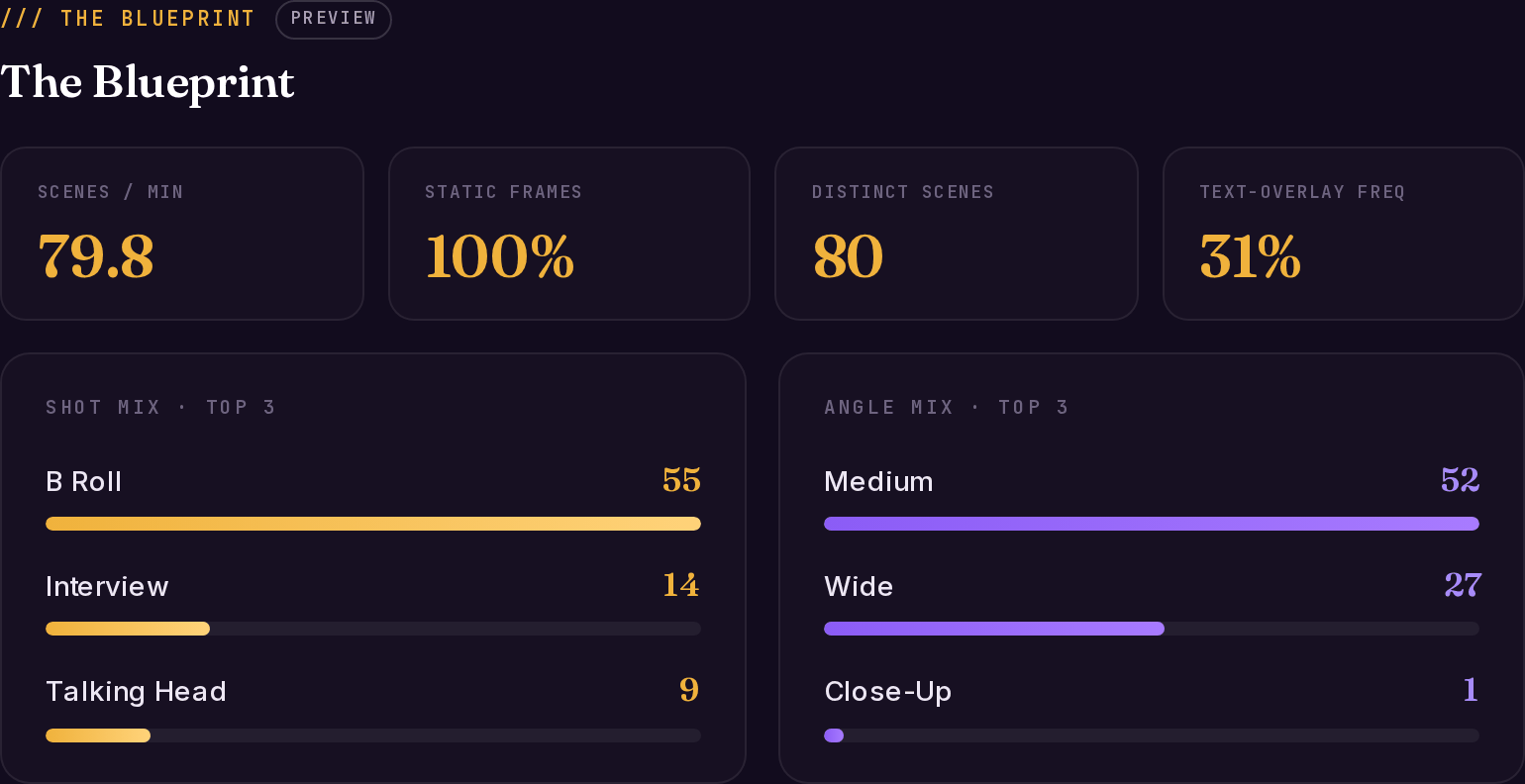 *Live example: [Coinbase — 'Break The Cycle' teardown](https://videngineer.com/teardowns/cinematic/coinbase-break-the-cycle-manifesto-teardown/), Blueprint tab.*
## How it's sampled
Frame sampling adapts to the video's length, so fast-cut teasers and long-form videos both get sensible coverage:
| Video length | Sampling interval |
| ---------------- | ----------------- |
| Under 35 seconds | every 1s |
| Under 5 minutes | every 2s |
| 5–20 minutes | every 3s |
| 20–60 minutes | every 6s |
| Over 60 minutes | every 10s |
When the engine detects montage-grade cut density, it samples denser still — so a 20-second teaser cutting every half-second doesn't lose half its shots.
## What each frame carries
Every sampled frame is read individually. These per-frame fields feed everything else in the blueprint:
| Field | What it holds |
| ----------------- | ------------------------------------------------------------------------------------------------------ |
| `scene_type` | What kind of shot this is — talking head, b-roll, product close-up, interview, map/diagram, text card… |
| `visual_style` | realistic / illustrated / 3D / mixed / photo |
| `camera_angle` | wide / medium / close-up / aerial / POV |
| `subject` | What's on screen, in 20 words or fewer |
| `text_on_screen` | Any visible overlay text, verbatim |
| `animation_level` | `none` \| `subtle` \| `moderate` \| `heavy` — motion-graphics intensity, not camera motion |
| `dominant_colors` | Three hex codes per frame |
| `text_amount` | `none` \| `minimal` \| `moderate` \| `heavy` |
## The blueprint fields
The aggregate blueprint is what the **The Blueprint** tab renders (and what `blueprint.json` exports from the app):
| Field | What it tells you |
| ---------------------------------------------------------------------- | -------------------------------------------------------------------------------------------------------------------------------------------------------------------------------- |
| `video_duration_seconds` / `total_frames_analyzed` | Runtime and how many frames were read |
| `distinct_scenes` | Real scene count, deduped by subject change |
| `scenes_per_minute` | The pacing number. High = attention-managed; low = deliberate |
| `scene_type_distribution` | Count + % for every shot type — the shot mix |
| `camera_angle_distribution` | Count + % per angle — the camera language |
| `visual_style_distribution` | How consistent the visual treatment is |
| `animation_distribution` / `animated_frames_pct` / `static_frames_pct` | How much of the video is motion graphics vs. static footage |
| `text_overlay_frequency` | % of frames carrying on-screen text |
| `color_mood_board` | Top 6 colors across the whole video, as hex |
| `audience_prediction` | Who the visuals are aimed at, read from the frames |
| `hook_score` | 0–10, a *visual* read of the first 3 frames — text presence, tight framing, motion. The script layer has its own content-based hook score; see [Hooks & re-hooks](/layers/hooks) |
| `estimated_reproduction_cost` / `cost_breakdown` | A rough static/animated/map scene split with per-scene cost estimates — a scoping aid, not a quote |
| `production_recommendation` | Dominant style, dominant angle, and a suggested static/animated scene split for a rebuild |
| `scene_timeline` | The ordered list of distinct scenes with their frame data — the raw material behind [The Cuts](/layers/cuts) |
## What to do with it
* **Treat the shot mix as evidence, not taste.** If the top performer in your niche runs 60% tight talking-head and 30% product screen, that's the working pattern — write your scenes into those slots.
* **Read `scenes_per_minute` against your own edit.** A 3× pacing gap between your draft and the reference usually explains a retention gap better than the script does.
* **Use `text_overlay_frequency` to decide your caption strategy.** 30%+ overlay frequency in a performing video means the text layer is structural, not decorative.
* **Hand `color_mood_board` to whoever grades or generates your visuals** — it keeps a rebuild in the same visual family without copying any footage.
## Related layers
The blueprint's scenes as real, playable shots — clip by clip.
The narrative skeleton the visuals are carrying.
How well this build executes for its format.
Turn the blueprint into prompts your image and video tools understand.
*Live example: [Coinbase — 'Break The Cycle' teardown](https://videngineer.com/teardowns/cinematic/coinbase-break-the-cycle-manifesto-teardown/), Blueprint tab.*
## How it's sampled
Frame sampling adapts to the video's length, so fast-cut teasers and long-form videos both get sensible coverage:
| Video length | Sampling interval |
| ---------------- | ----------------- |
| Under 35 seconds | every 1s |
| Under 5 minutes | every 2s |
| 5–20 minutes | every 3s |
| 20–60 minutes | every 6s |
| Over 60 minutes | every 10s |
When the engine detects montage-grade cut density, it samples denser still — so a 20-second teaser cutting every half-second doesn't lose half its shots.
## What each frame carries
Every sampled frame is read individually. These per-frame fields feed everything else in the blueprint:
| Field | What it holds |
| ----------------- | ------------------------------------------------------------------------------------------------------ |
| `scene_type` | What kind of shot this is — talking head, b-roll, product close-up, interview, map/diagram, text card… |
| `visual_style` | realistic / illustrated / 3D / mixed / photo |
| `camera_angle` | wide / medium / close-up / aerial / POV |
| `subject` | What's on screen, in 20 words or fewer |
| `text_on_screen` | Any visible overlay text, verbatim |
| `animation_level` | `none` \| `subtle` \| `moderate` \| `heavy` — motion-graphics intensity, not camera motion |
| `dominant_colors` | Three hex codes per frame |
| `text_amount` | `none` \| `minimal` \| `moderate` \| `heavy` |
## The blueprint fields
The aggregate blueprint is what the **The Blueprint** tab renders (and what `blueprint.json` exports from the app):
| Field | What it tells you |
| ---------------------------------------------------------------------- | -------------------------------------------------------------------------------------------------------------------------------------------------------------------------------- |
| `video_duration_seconds` / `total_frames_analyzed` | Runtime and how many frames were read |
| `distinct_scenes` | Real scene count, deduped by subject change |
| `scenes_per_minute` | The pacing number. High = attention-managed; low = deliberate |
| `scene_type_distribution` | Count + % for every shot type — the shot mix |
| `camera_angle_distribution` | Count + % per angle — the camera language |
| `visual_style_distribution` | How consistent the visual treatment is |
| `animation_distribution` / `animated_frames_pct` / `static_frames_pct` | How much of the video is motion graphics vs. static footage |
| `text_overlay_frequency` | % of frames carrying on-screen text |
| `color_mood_board` | Top 6 colors across the whole video, as hex |
| `audience_prediction` | Who the visuals are aimed at, read from the frames |
| `hook_score` | 0–10, a *visual* read of the first 3 frames — text presence, tight framing, motion. The script layer has its own content-based hook score; see [Hooks & re-hooks](/layers/hooks) |
| `estimated_reproduction_cost` / `cost_breakdown` | A rough static/animated/map scene split with per-scene cost estimates — a scoping aid, not a quote |
| `production_recommendation` | Dominant style, dominant angle, and a suggested static/animated scene split for a rebuild |
| `scene_timeline` | The ordered list of distinct scenes with their frame data — the raw material behind [The Cuts](/layers/cuts) |
## What to do with it
* **Treat the shot mix as evidence, not taste.** If the top performer in your niche runs 60% tight talking-head and 30% product screen, that's the working pattern — write your scenes into those slots.
* **Read `scenes_per_minute` against your own edit.** A 3× pacing gap between your draft and the reference usually explains a retention gap better than the script does.
* **Use `text_overlay_frequency` to decide your caption strategy.** 30%+ overlay frequency in a performing video means the text layer is structural, not decorative.
* **Hand `color_mood_board` to whoever grades or generates your visuals** — it keeps a rebuild in the same visual family without copying any footage.
## Related layers
The blueprint's scenes as real, playable shots — clip by clip.
The narrative skeleton the visuals are carrying.
How well this build executes for its format.
Turn the blueprint into prompts your image and video tools understand.