> ## Documentation Index
> Fetch the complete documentation index at: https://docs.videngineer.com/llms.txt
> Use this file to discover all available pages before exploring further.
# The Cuts
> Every real shot in the video as a playable clip with reference frames, timing, and a technique-focused title.
The Cuts answers: **what are the actual shots, and what technique is each one pulling off?** Instead of trusting a model's guess about where scenes begin, videngineer detects real shot boundaries straight from the footage, then extracts each shot as a continuous clip — with audio — plus its first frame, last frame, and the real frames in between.
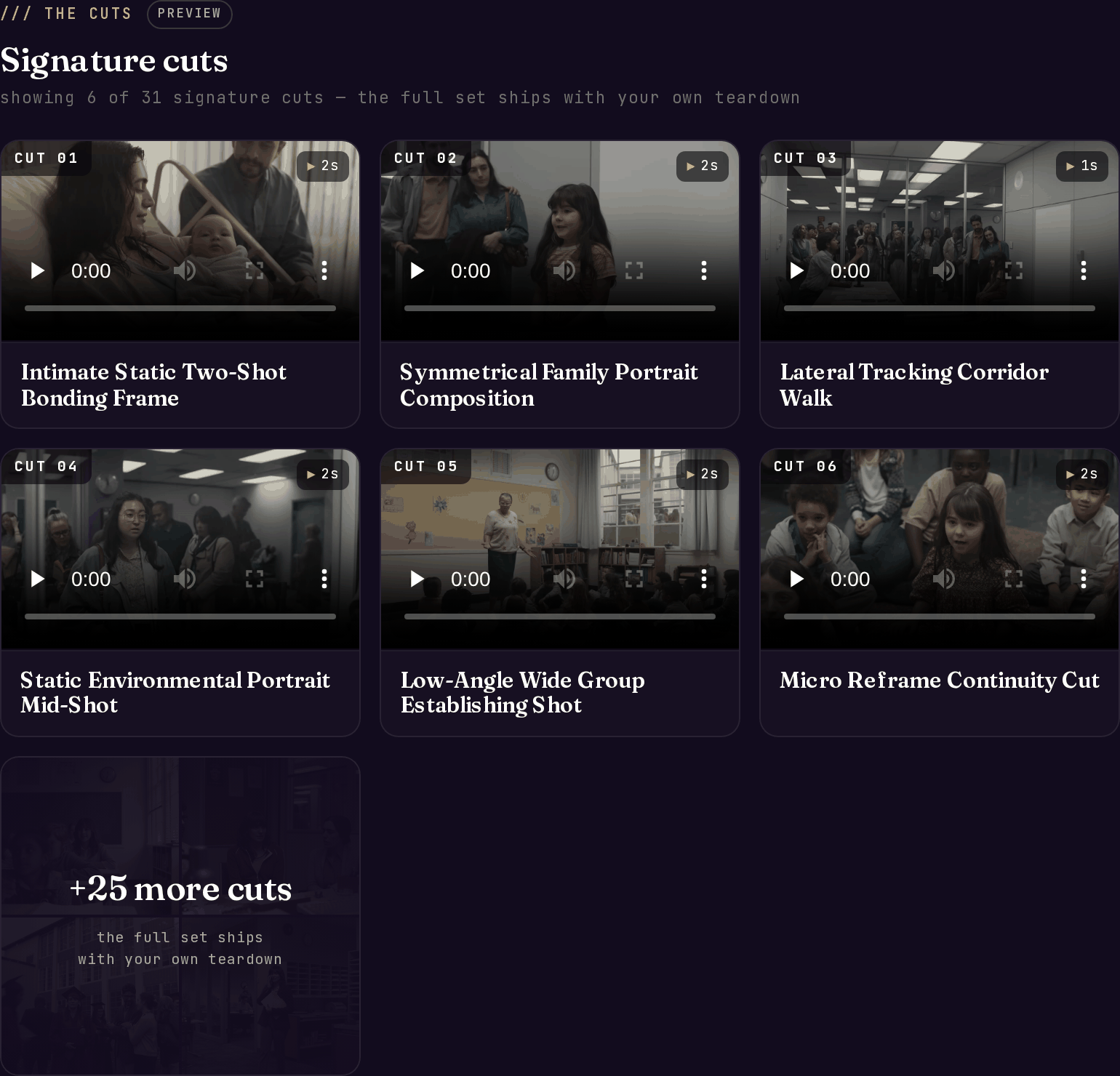 *Live example: [Coinbase — 'Break The Cycle' teardown](https://videngineer.com/teardowns/cinematic/coinbase-break-the-cycle-manifesto-teardown/), The Cuts tab — 31 detected cuts.*
## How cuts are detected
Two signals are blended:
1. **Pixel-level scene scores** from the footage itself catch hard cuts precisely.
2. **Per-frame subject changes** from the [Blueprint](/layers/blueprint) catch the soft transitions that pixel-diffing misses — common in AI-generated montages where shots dissolve into each other.
When the subject changes between two sampled frames, the boundary is placed at the strongest scene-score moment inside that window — frame-accurate even when the transition is smooth. The detection threshold adapts to the video's pacing, so a hyper-fast montage and a slow cinematic piece both resolve into sensible shots, and a genuine single-take stays one shot.
## What each cut contains
| Field | What it holds |
| ------------------------------------------ | ------------------------------------------------------------------------------------------------------------------------------------------------- |
| `name` | A technique-focused title — the production move, not the on-screen subject (e.g. "Lateral Tracking Corridor Walk") |
| `description` | What's in the shot |
| `start_ts` / `end_ts` / `duration_seconds` | Real timing, read from the footage |
| `clip_url` | The shot as a streamable MP4, with audio, up to 1080p |
| `frame_urls` | First frame + up to 5 real in-shot frames + last frame |
| `tags` | Technique tags for scanning the grid |
| `directors_brief` | On demand: `how_they_did_it`, `agent_instructions`, `use_cases`, `difficulty`, `animation_notes` |
| `recreation_prompts` | On demand: a `group_prompt` plus `per_frame` entries (`recreation_prompt`, `camera`, `transition_to_next`) — see [Recreation](/layers/recreation) |
## Exports
From the app's Cuts tab you can download:
* **Recipe `.md`** — the full cut list as a markdown brief you can hand to an editor or an agent
* **All cuts (ZIP)** — every clip as a file
## What to do with it
* **Build your shot list from the cut titles.** The technique names are deliberately topic-agnostic — "Symmetrical Family Portrait Composition" works for any subject. Your shot list is the titles, in order, with your content poured in.
* **Time your edit against the durations.** If the reference holds establishing shots for 2 seconds and reaction shots for 1, those numbers transfer directly to your timeline.
* **Watch the first and last frames of each cut** to understand the transitions — what image the editor cut *from* and *to* is usually the trick.
* **Reference, don't copy.** The clips exist so you can study the technique; the recreation layer turns each technique into prompts for building your own footage.
## Related layers
The aggregate stats these shots roll up into.
Per-cut recipes and prompts for rebuilding each technique.
What the audio is doing during each of these shots.
The recurring people, places, and props these cuts are made of.
*Live example: [Coinbase — 'Break The Cycle' teardown](https://videngineer.com/teardowns/cinematic/coinbase-break-the-cycle-manifesto-teardown/), The Cuts tab — 31 detected cuts.*
## How cuts are detected
Two signals are blended:
1. **Pixel-level scene scores** from the footage itself catch hard cuts precisely.
2. **Per-frame subject changes** from the [Blueprint](/layers/blueprint) catch the soft transitions that pixel-diffing misses — common in AI-generated montages where shots dissolve into each other.
When the subject changes between two sampled frames, the boundary is placed at the strongest scene-score moment inside that window — frame-accurate even when the transition is smooth. The detection threshold adapts to the video's pacing, so a hyper-fast montage and a slow cinematic piece both resolve into sensible shots, and a genuine single-take stays one shot.
## What each cut contains
| Field | What it holds |
| ------------------------------------------ | ------------------------------------------------------------------------------------------------------------------------------------------------- |
| `name` | A technique-focused title — the production move, not the on-screen subject (e.g. "Lateral Tracking Corridor Walk") |
| `description` | What's in the shot |
| `start_ts` / `end_ts` / `duration_seconds` | Real timing, read from the footage |
| `clip_url` | The shot as a streamable MP4, with audio, up to 1080p |
| `frame_urls` | First frame + up to 5 real in-shot frames + last frame |
| `tags` | Technique tags for scanning the grid |
| `directors_brief` | On demand: `how_they_did_it`, `agent_instructions`, `use_cases`, `difficulty`, `animation_notes` |
| `recreation_prompts` | On demand: a `group_prompt` plus `per_frame` entries (`recreation_prompt`, `camera`, `transition_to_next`) — see [Recreation](/layers/recreation) |
## Exports
From the app's Cuts tab you can download:
* **Recipe `.md`** — the full cut list as a markdown brief you can hand to an editor or an agent
* **All cuts (ZIP)** — every clip as a file
## What to do with it
* **Build your shot list from the cut titles.** The technique names are deliberately topic-agnostic — "Symmetrical Family Portrait Composition" works for any subject. Your shot list is the titles, in order, with your content poured in.
* **Time your edit against the durations.** If the reference holds establishing shots for 2 seconds and reaction shots for 1, those numbers transfer directly to your timeline.
* **Watch the first and last frames of each cut** to understand the transitions — what image the editor cut *from* and *to* is usually the trick.
* **Reference, don't copy.** The clips exist so you can study the technique; the recreation layer turns each technique into prompts for building your own footage.
## Related layers
The aggregate stats these shots roll up into.
Per-cut recipes and prompts for rebuilding each technique.
What the audio is doing during each of these shots.
The recurring people, places, and props these cuts are made of.