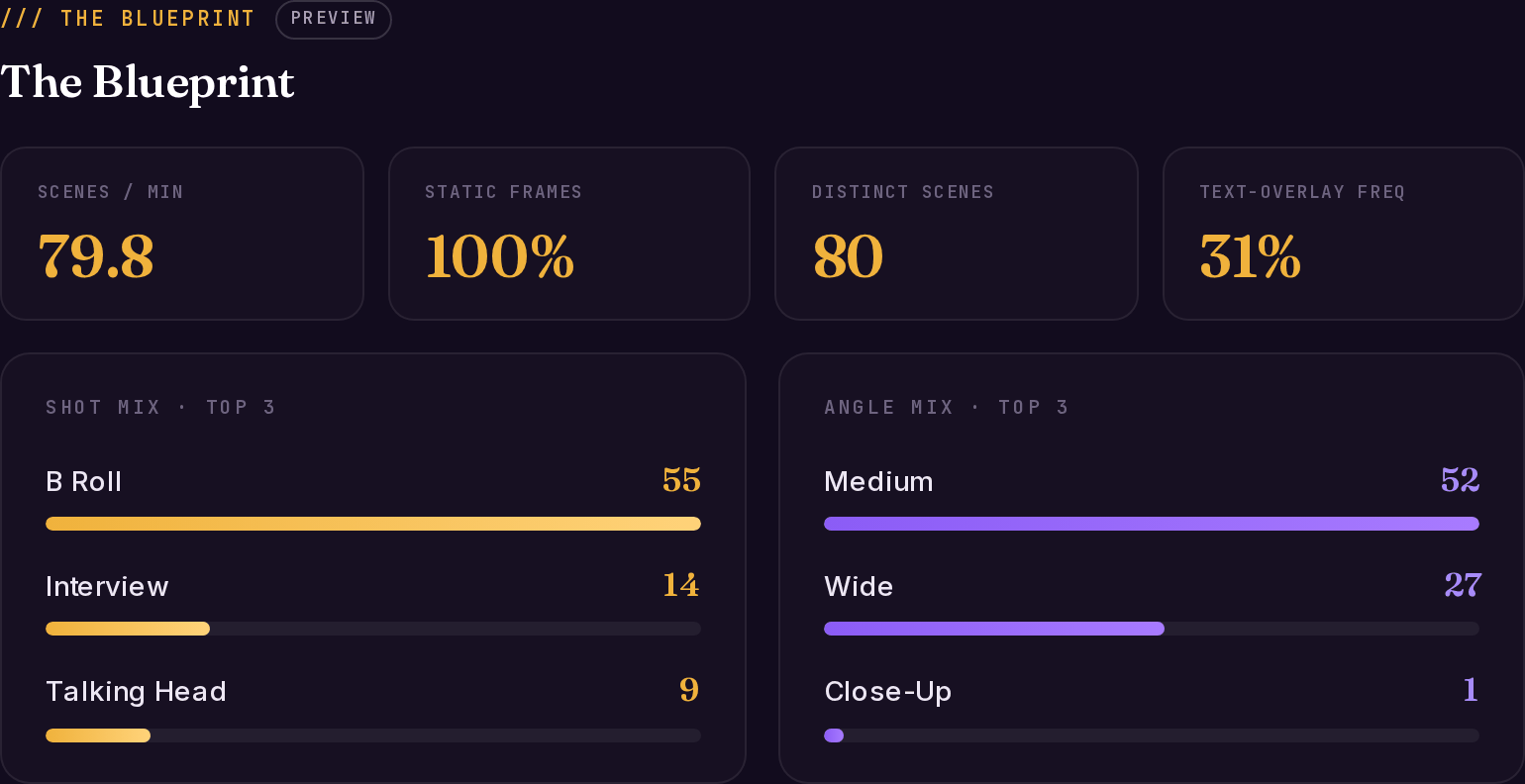
The Blueprint answers one question: how is this video built, visually? videngineer samples frames across the whole runtime, reads each one with a vision model, and aggregates the result into a production-style breakdown — shot types, camera angles, animation intensity, text overlays, color, and pacing. It’s the layer you open when you want to know what the edit is doing, not what the script is saying.
Blueprint tiles showing scenes per minute, static frames, distinct scenes, text-overlay frequency, plus shot mix and angle mix
Live example: Coinbase — ‘Break The Cycle’ teardown, Blueprint tab.

How it’s sampled

Frame sampling adapts to the video’s length, so fast-cut teasers and long-form videos both get sensible coverage:
Video lengthSampling interval
Under 35 secondsevery 1s
Under 5 minutesevery 2s
5–20 minutesevery 3s
20–60 minutesevery 6s
Over 60 minutesevery 10s
When the engine detects montage-grade cut density, it samples denser still — so a 20-second teaser cutting every half-second doesn’t lose half its shots.

What each frame carries

Every sampled frame is read individually. These per-frame fields feed everything else in the blueprint:
FieldWhat it holds
scene_typeWhat kind of shot this is — talking head, b-roll, product close-up, interview, map/diagram, text card…
visual_stylerealistic / illustrated / 3D / mixed / photo
camera_anglewide / medium / close-up / aerial / POV
subjectWhat’s on screen, in 20 words or fewer
text_on_screenAny visible overlay text, verbatim
animation_levelnone | subtle | moderate | heavy — motion-graphics intensity, not camera motion
dominant_colorsThree hex codes per frame
text_amountnone | minimal | moderate | heavy

The blueprint fields

The aggregate blueprint is what the The Blueprint tab renders (and what blueprint.json exports from the app):
FieldWhat it tells you
video_duration_seconds / total_frames_analyzedRuntime and how many frames were read
distinct_scenesReal scene count, deduped by subject change
scenes_per_minuteThe pacing number. High = attention-managed; low = deliberate
scene_type_distributionCount + % for every shot type — the shot mix
camera_angle_distributionCount + % per angle — the camera language
visual_style_distributionHow consistent the visual treatment is
animation_distribution / animated_frames_pct / static_frames_pctHow much of the video is motion graphics vs. static footage
text_overlay_frequency% of frames carrying on-screen text
color_mood_boardTop 6 colors across the whole video, as hex
audience_predictionWho the visuals are aimed at, read from the frames
hook_score0–10, a visual read of the first 3 frames — text presence, tight framing, motion. The script layer has its own content-based hook score; see Hooks & re-hooks
estimated_reproduction_cost / cost_breakdownA rough static/animated/map scene split with per-scene cost estimates — a scoping aid, not a quote
production_recommendationDominant style, dominant angle, and a suggested static/animated scene split for a rebuild
scene_timelineThe ordered list of distinct scenes with their frame data — the raw material behind The Cuts

What to do with it

  • Treat the shot mix as evidence, not taste. If the top performer in your niche runs 60% tight talking-head and 30% product screen, that’s the working pattern — write your scenes into those slots.
  • Read scenes_per_minute against your own edit. A 3× pacing gap between your draft and the reference usually explains a retention gap better than the script does.
  • Use text_overlay_frequency to decide your caption strategy. 30%+ overlay frequency in a performing video means the text layer is structural, not decorative.
  • Hand color_mood_board to whoever grades or generates your visuals — it keeps a rebuild in the same visual family without copying any footage.

The Cuts

The blueprint’s scenes as real, playable shots — clip by clip.

Script analysis

The narrative skeleton the visuals are carrying.

Scorecard

How well this build executes for its format.

Recreation

Turn the blueprint into prompts your image and video tools understand.